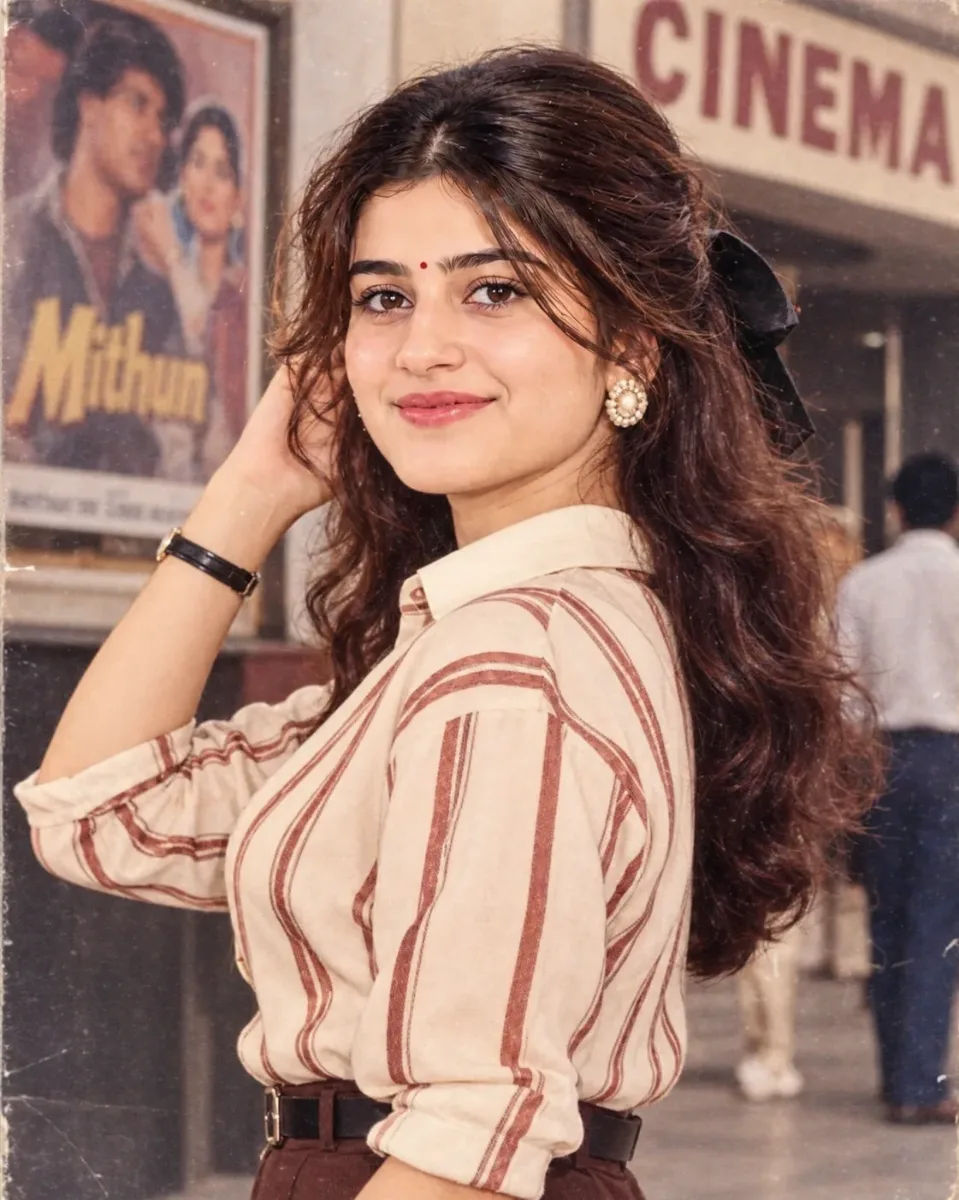
1980s Cinema Hall AI Photo Prompt for Girls – Retro Vintage Look
Create stunning 1980s cinema hall AI photos for girls with retro fashion, vintage movie theater backgrounds, and nostalgic vibes using these Gemini AI photo prompts.
Using the uploaded photo as the identity reference, recreate the person as they might have looked in the 1980s. Keep the facial identity recognizable while giving them authentic 1980s makeup, an era-appropriate hairstyle and a shirt-and-trouser outfit of the period.

Photograph them like a vintage click: standing outside a cinema hall, head turned back over the shoulder towards the camera, one hand touching her hair.

Subtle film grain and a slightly faded photographic texture. The result should look like a real portrait taken in the 1980s rather than a modern image. 4:5 ratio.
Use this photo prompt to get the 1980s look shown above in one go. There is nothing to edit by hand: paste, send, and let the model do the work. It leans on outdoor setting, film-grain finish and vintage finish.
What this prompt creates
The instruction combines outdoor setting, film-grain finish, vintage finish and vertical 4:5 frame into one 1980s image. At roughly 93 words it is a short, flexible prompt, so expect some variation between runs. Either way, the result stays recognisably you because the source photo drives the likeness.
How to use this photo prompt
- Tap Copy prompt above to copy the full text.
- Open ChatGPT and start a new chat.
- Upload the photo you want to transform.
- Paste the prompt and send it.
- If the first result is not quite right, regenerate once or twice. Small changes in wording shift the style a lot.
Tips for a better result
- Mind the background. It replaces your backdrop with an outdoor setting. A source photo with a plain or blurred background swaps over most cleanly.
- Shoot for the crop. The output is a vertical 4:5 frame, so leave headroom in your original rather than filling the frame.
- Keep the finish. The film-grain finish is part of the look. If the model skips it, repeat it as the last line of the prompt.
- Crop before you generate. Removing clutter from the edges usually beats asking the model to remove it.
- Start from your best copy. Use the highest-resolution photo you have. Detail the model can see is detail it can keep.
Who this 1980s prompt suits
This one works especially well for Girls. It suits Instagram posts, profile pictures and WhatsApp display photos, and it holds up on both phone and desktop screens.
More prompts like this
Browse every 1980s Photo Prompt in this collection, or head back to the newest AI photo prompts on Evergreen Prompt. All of them are free to copy and use.
Curious about the texture? Read about film grain.
What makes this 1980s style work
Good prompts read like a shot list. The subject comes first, then the setting, then the light, then the camera, then the finish. Because each part has its own sentence, the model treats them as separate instructions and rarely drops one.
To adapt it, keep the same five-part order and change only the descriptive words. A prompt split into clear parts is easier to tweak than one long sentence.
Related Prompts in 1980s Photo Prompt
 GEMINI
 CHATGPT
 CHATGPT
 CHATGPT
 CHATGPT